
Hey everyone,
We'll be adding our Webcodec player to MistServer 3.11. We're excited for this protocol as it is not build on Media Source Extensions (MSE), but a layer deeper on WebCodecs. This allows much more control on how the media is played back and allows for much deeper communcation back to the server. Though I suppose for those that are less interested it simply means a player that should just work regardless of codecs/platform.
Of course multiple protocols/methods/players have promised the same thing, so whether this ends up being true is something to be seen. The reason why we're excited for it is simply because it allowed us to build something fun and allow us to expose all sorts of metrics to viewers that are fun to look at. Currently we see it as a beta player as while we've tested it quite extensively it's almost impossible to test every device and situation. Of course there's some restrictions as well, it cannot work without SSL, with the exception of localhost.
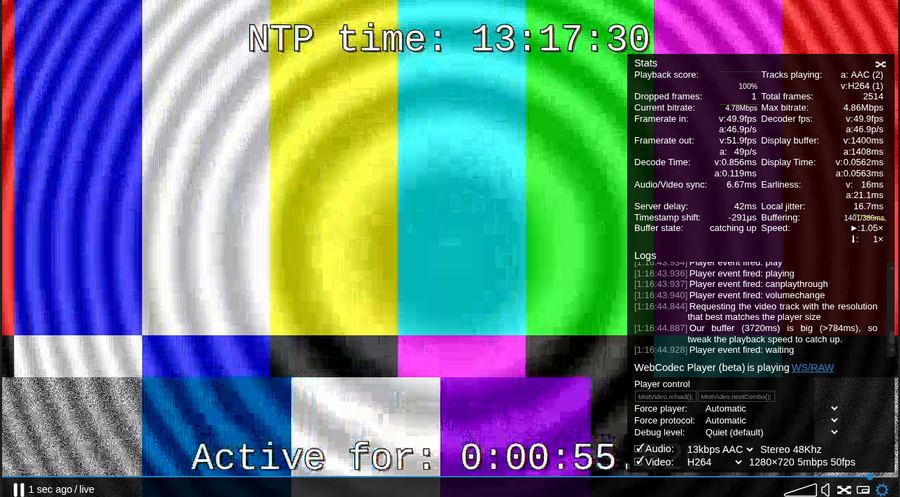
Of course we can't exactly talk about all the extra stats without providing or explaining them:
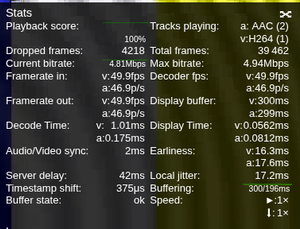
| Stat | Description | Notes |
|------|---------------|--------|
|playbackscore| Checks whether the playback is realtime by measuring time, frame duration and frames shown| network hiccups can cause slight drops, but generally you should see this at 100% for a healthy stream|
|tracks playing| The tracks the player is receiving from the server | Depending on how a track switch performs you could see 2 audio/video tracks at during a switchover|
|dropped frames| frames not shown by the video component| These are frames that are received, but not shown. For example when seeking and receiving frames before the requested time to show.|
|corrupted frames| frames received and recognized as corrupted| This stat is not shown if it's not relevant|
|total frames| total amount of frames received from the server | This is including dropped/corrupted frames|
|current bitrate| The current bitrate of the current tracks playing |This includes all tracks currently shown in tracks playing|
|max bitrate| The highest amount of bitrate detected from the current tracks playing||
|framerate in| Frames per second incoming for video, or packets per second for audio/control/metadata| v is used for video, a for audio, C for control channel (metadata & server/player communication)| Note that subtitles and specific metadata can be received, but not shown in this statistic.|
|framerate out| Frames or packets per second played| Generally this should match the framerate in |
|decoder fps|The amount of frames/packets per second decoded for playback| Audio/video needs to be decoded before it can be shown|
|display buffer| the amount of milliseconds available for playback for video v and audio a| Playback stutters/issues will appear if the buffer is too small|
|decode time| the time needed to decode an video frame or audio packet | If this is bigger than the duration of a video frame or bigger than 23ms for audio that hints to a decode problem|
|display time| the duration needed to output a video frame or audio packet||
|audio/video sync| the current difference between the last used video/audio timestamps| 0 ms would mean perfect sync. Good sync should have this to a value lower than earliness |
|earliness| The amount of time an video frame or audio packet was send to be displayed too early.| High values will mean stutters start appearing. You want this value at 0 or below the time between your monitor frames.|
|server delay| The measured time for the server to respond to requests| |
|local jitter| The measured necessary delay between the player and the server to ensure stable playback| You could see this the potential minimal latency between you and the server|
|timestamp shift| The difference in time for a frame/packet to go into the decoder and come out| You will want this as close to 0 as possible.|
|buffering| current available buffer / target (smallest possible buffer for reliable playback) | The player will try to get as close to the last value as possible, but will stop increasing playback speed when it's close enough|
|buffer state| This describes whether the buffer tries to grow/shrink or stay the same to improve playback quality| The buffer state will impact the speed of playback and buffering target . |
|speed| the current playback speed|This will automatically increase/decrease by about 5% to slowly catch up or grow the buffer for playback quality depending on the buffer state|
|messages sent| If a control channel is available, the amount of messages sent to the server||
|messages received| If a control channel is available, the amount of messages received from the server ||
|picture losses| frames not received from the server ||
|packets lost| measured packet loss between player and the server |This only shows up if it happens, which can happen with WebRTC playback|